 Sekisho関所
View on GitHub
Sekisho関所
View on GitHub
A checkpoint for AI payments
Your AI can pay.
Who checks
the recipient?
For agent builders and x402 services: Sekisho turns wallet-risk evidence into a decision enforced before signing. Let a purchase proceed, pause it for review, or refuse it.
Explore the simulation now · Live testnet validation pending
The everyday stakes
A helpful assistant.
An unchecked payment.
Imagine your AI assistant buying a useful report for five cents. The seller asks it to pay a wallet. A convincing request does not tell you whether that wallet has known risk signals.
Without a check before signing
- Payment request
- Money moves
- Risk noticed later
A mistake can be hard to undo.
With Sekisho in the payment path
- Payment request
- Check + policy
- Allow, hold or block
Evidence informs the decision before signing.
The payment checkpoint
A second look,
before money moves.
The assistant asks to pay. Sekisho checks the recipient’s wallet against risk evidence and your payment rules. The result determines what can happen next.

For banks and payment providers
Moving money comes
with responsibility.
A risky transaction can create investigation work, remediation costs and, where applicable rules are breached, regulatory penalties. Teams also need a record of what they knew when they acted.
A prohibited recipient
Sanctions exposure
Check risk evidence before signingSuspicious activity
Investigation and remediation
Route uncertain cases to human reviewAn unexplained decision
Weak evidence for review
Keep the policy and reasons with the caseDuties depend on jurisdiction and activity. U.S. sanctions context: OFAC. International AML context: FATF guidance. Sekisho is a prototype control, not a complete compliance programme.
Follow the decision
One payment.
Four possible paths.
Take a 30-second walkthrough. Change the counterparty, inspect the evidence, and see where the same payment goes.
Guided simulationSynthetic examples · No screening calls or transactions
The walkthrough needs JavaScript. You can still explore the source and run the labelled fixture console locally.
Open the setup guide →- 01 Request
- 02 Evidence
- 03 Decision
- 04 Outcome
Explore the officer's options (simulation)
The compliance console
Clear reasons.
A human review path.
Follow payments from first screening to final review. Inspect the signals, see what the policy decided, and verify the report.
Run the console locally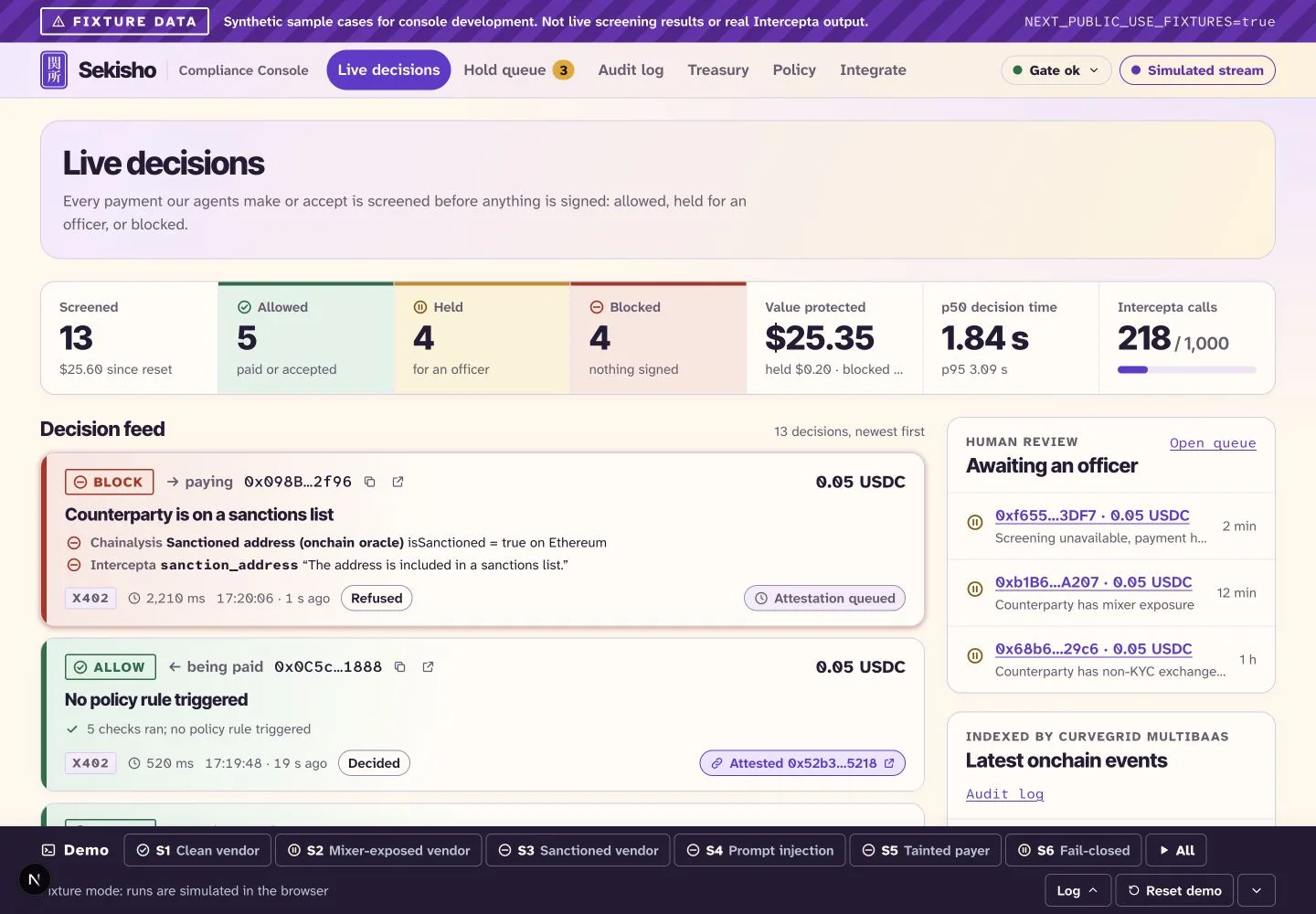
Human judgment, at the right moment
Time for a person
to take a look.
A HOLD decision first pauses signing. If a separate escrow deposit is confirmed, test USDC can wait in a smart contract while an authorized operator reviews the case for release or refund.
A report hash is a digital fingerprint: it checks report consistency, not the truth of the risk evidence or whether payment settled. Application review does not replace legal restrictions on handling funds.
Explore the escrow contracts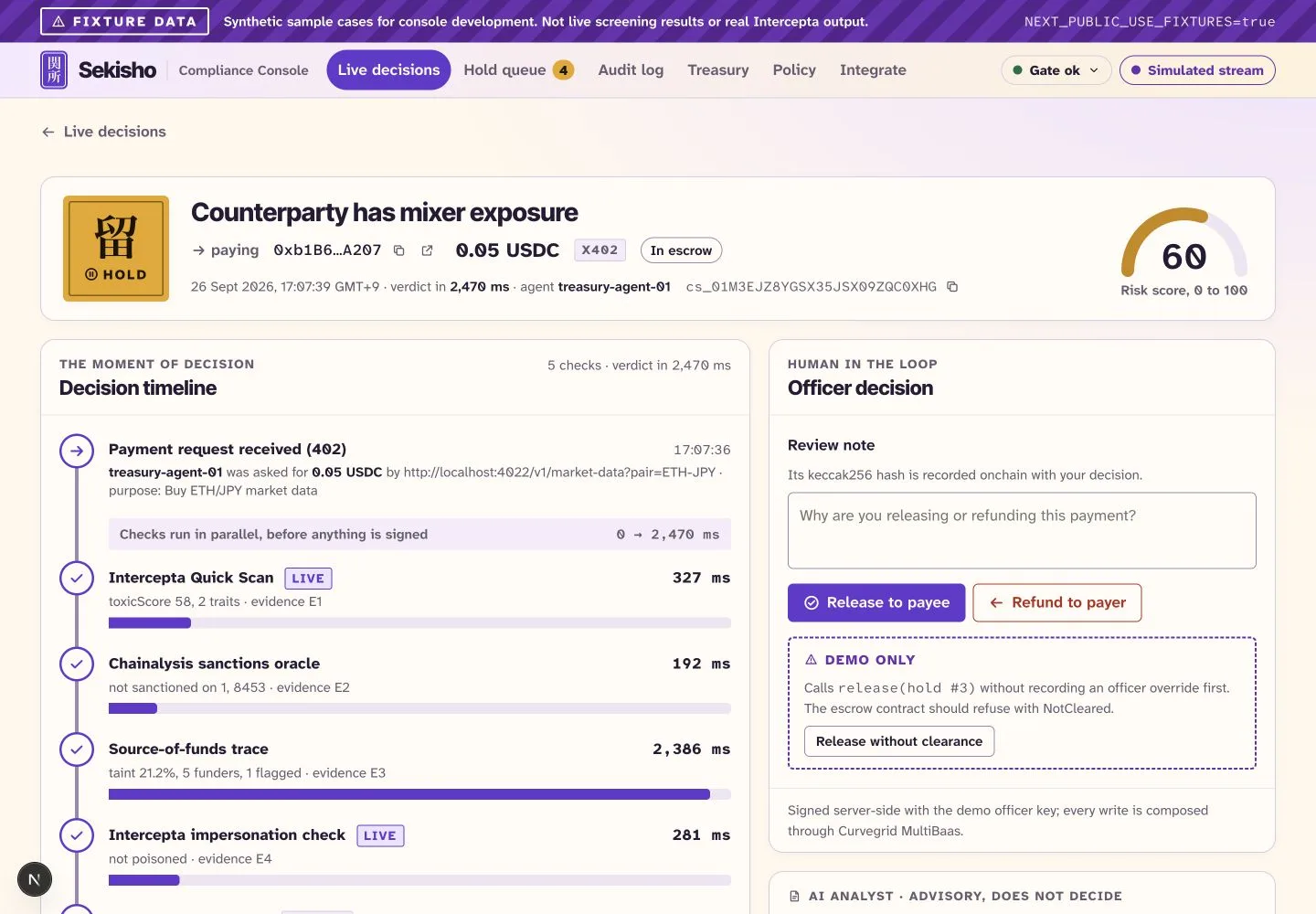
Behind the checkpoint
Evidence in.
A controlled next step.
- Intercepta
- Supplies wallet-risk evidence in the screening flow.
- Curvegrid MultiBaas
- Supports contract interactions and indexed events.
- x402
- Connects payment requests to the assistant’s payment flow.
AI can help explain the case. The policy controls the verdict, and the payment tool enforces it. Live end-to-end validation remains pending; follow the build status.
Built for the agent workflow
A checkpoint.
On both sides.
Screen before paying. Screen before accepting payment. Connect through the Python SDK, x402 hooks, or MCP tools.
from sekisho import SekishoClient, SekishoError

USDC = "0x036CbD53842c5426634e7929541eC2318f3dCF7e"


async def screen_payment(counterparty, gate_url="http://localhost:8000"):
    async with SekishoClient(gate_url) as gate:
        try:
            decision = await gate.screen(
                counterparty=counterparty,
                direction="outbound",
                amount="50000",  # 0.05 USDC, in atomic units
                asset=USDC,
                payment_chain_id=84532,  # Base Sepolia
                source="direct",
                agent_id="my-agent",
            )
        except SekishoError:
            return "HOLD"  # No usable decision: do not sign.
        return decision.verdict
Install the SDK, start your gate, then call await screen_payment(counterparty). This screens only; signing requires ALLOW. Use the x402 hooks to enforce it in the payment flow.
A clear starting point
Before you
try it.
Can I explore without API keys?
Yes. Try the guided simulation above, or clone the repository and run the console's fixture preview. It uses synthetic cases and browser-only simulations, with a visible fixture banner. Follow the quick start.
Is the live payment stack deployed?
Not yet. The components are implemented and locally tested. Live service configuration, testnet contract deployment, and the complete payment rehearsal remain pending. See the readiness checklist.
Does an ALLOW mean a wallet is safe?
No. It is a point-in-time decision under the configured demo policy, based on available evidence. Sekisho is not a certified AML programme or legal advice.
Where do payments happen?
The project's value-transfer and contract chain is Base Sepolia. Ethereum and Base mainnet are used read-only for screening. The public website makes no payments and does not connect to a wallet.
Sekisho · 関所